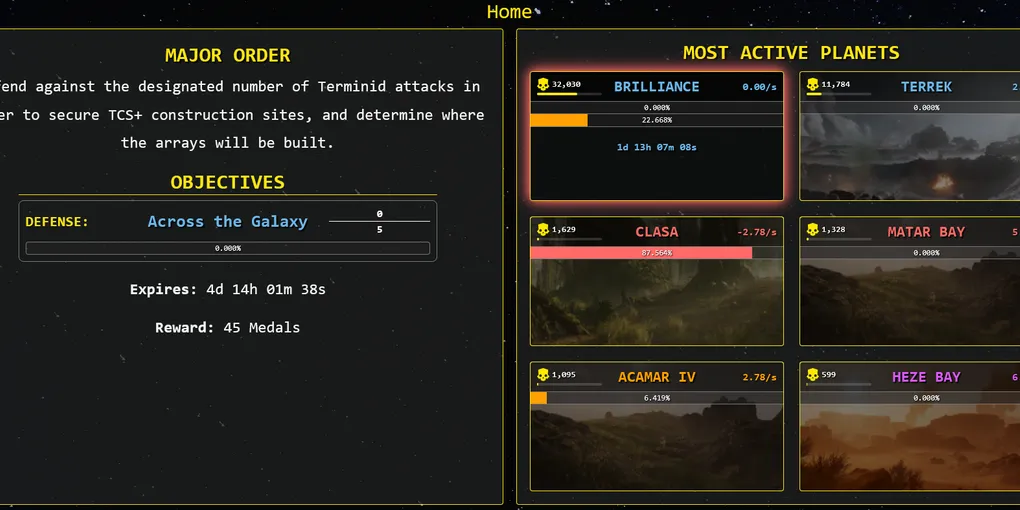
Large Helldivers 2 App Updates - What's New?
I have been fortunate enough to dedicate free time back into my Helldivers 2 project since completing the Security+ exam. When I took a focused break back in May to study for my certification, I pushed a major update, [0.9.0], to the live server. It contained major implementations I have wanted to work on since the birth of the project idea, but of course, not without its issues.
The time I have recently spent has brought me to a more resolved state of the app, and I would like to take some time to highlight some of the major changes I have made; provide some insight in its choice and development.
I will be referring to updates ranging from the [0.9.0] update pushed on May 10th this year to the most recent hotfix dated June 23rd.
- A live refresh system has been implemented to provide the user with real-time updates on in-game data.
- Reformatted and provided more detail within each Planet Modal card pop-up.
- Finally introduced the pre-alpha version of the Galactic Map.
- Tidied up both the dedicated
Galaxy StatsandMajor Orderspages. - Added in the
newsFeedParserfor dispatch messages. - Created a static file mount so that development can rely on local data in case of an error fetching live results.
- Retired Azure’s web page infrastructure for Cloudflare’s (with new domain).
- Implementation of proper mobile formatting.
Minor changes have been made beyond the scope above, of course. But these are the larger changes I have made that have/had taken time to implement.
Live Refresh System
From the birth of the initial app concept, one feature I was sure of eventually including was a system that refreshes the fetched data in real-time to give a semi-accurate reading of certain variables. The plan seemed straightforward in my head - we must have at least two data points to compare, whether it is the player count sixty seconds ago versus now, or a planet’s health’s regeneration per second. We then take the difference between the old and newly fetched number and dynamically adjust the value/variable accordingly.
Let’s take the example of player count. For the sake of simplicity, let’s say Super Earth has 1000 players currently active on the surface. If 1:00pm gives me a reading of 1000 people, but the following minute (1:01pm) gives me a reading of 1050, then there is an increase of fifty people over the past minute. And thus, the planet’s player count would adjust by that rate per minute: +50 per minute. Same works with the inverse - if I have 1000 people on Super Earth’s surface, and the next minute I am down to 950, then the player count value will show a decrease of +50 players per minute.
This change alone brought my site to life and emphasized the importance of dynamic elements in the app. Right now the live refresh system only accounts for the player count number and the health regen per second rate. Eventually the goal will be to have any stats on the web app update live.
Planet Info Cards
I was able to finally add some much needed info on each planet- a description of the biome for the user to read and a check to see if there are any active hazards on the planet such as fire tornados (as if the original tornado wasn’t enough).
Admittedly, the current player population graphs found in the info cards was inaccurate and at best outdated. I had quite some trouble with this especially due to formatting reasons. So for the time being, I have opted to remove the graph data. I would like to reintroduce a more desirable state down the line.
The Galactic Map
This is the largest addition by far to the app. I have been quite intimidated by the process and approach to creating a spherical grid portraying the galactic map, followed by the appropriate planets being found in their respective sectors. I debated essentially passing AI the task and let it do it all for me, but this was another opportunity to expand my toolset.
The single greatest resource that made this possible for me was connecting and reaching out to the helldivercompanion.com community’s discord. I was extremely fortunate enough to have one of the app developers reach out to me with the exact answers to my questions.

When I had realized just how genious the implementation was, the goal became much clearer- create the appropriate coordinate plane, list and group each sector’s quadrants, and colour them relative to the correlating factions. I could not have been more grateful for the insight.
The execution of this plan, however, was a different story altogether. First of all, I understood how graphs were built, but the rotating angle relative to the centre of the graph felt like a different beast. This is where my resources and my past experience came into play.
AI can be a great tool when used in the right circumstances for the right purposes. What I did NOT want to do was tell an AI chatbot to “build me the entire graph; here is the info.” If I were to personally continue development on the map down the line I want to be sure I actually understand what exactly is happening to create, rotate, and draw the map components.
Using Claude AI, the first prompt I sought out was to draw two coordinate planes with 0 in the middle extending to 5 or -5 in the x and y respectively. Leave the first plane as is, but for the second, can you show me what the approach would be to rotate the graph on the centre point? I then went through the process of breaking down and understanding the block of code that rotates the graph. Not an easy feat, as my math skills need some practice.
Eventually I was able to get the sectors grouped together, but needed help removing the lines for intersecting sections.
Out of every part of this project, the formation of the actual map itself (the grid layout and sector drawing) is the most heavily influenced by AI. I seek to continue to understand how this works to my own benefit, however with full transparency Claude AI did help in the construction of the map grid.
The planet supply lines are properly implemented so any new planet additions are mapped accordingly, the sectors are shaded in their correlating faction’s main colour, and planets that are accessible to players are labeled with the game’s Liberation icon.
I need to finish adding in texture files for the shattered planets such as Angel’s Venture as they appear as greyed out icons. But the first initial implementation of the map is complete and I can now focus on refining and adding new features.
Reformatting Galaxy Stats and MO Page
This was one of the easier changes I made. I disliked how the stats sat within the page Galaxy & MO pages and how it was creating page layout issues. So I went and cleaned both pages up, making sure to add the proper Major Order functions that appear on the Homepage.
I also added in a new section to include any of the Super Earth Dispatch messages on the Homepage for users to stay informed on any campaign developments.
Implementing Static File Mounting
Throughout a large portion of this development process, my local project would constantly rely on fetching live data for any and all testing purposes. And while it was effective in helping me resolve inaccuracy issues, I was encountering a relatively common issue; if my app could not reach the API then I could not test my local development.
So I implemented static file mounting so when I work on my project locally I can save a cache of data information to then work from. With this I have the choice to either update it to recent information or to leave it at the last saved cache. Either way, I do not encounter any more issues in fetching data during local development.
Retired Azure's Static Web App Infrastructure
For the majority of this project’s lifespan I have been using Azure Static Web Apps to host my app. The initial use-case came from my practice with security tools. While it worked to achieve what I needed it to- host the site for users- there was a glaringly obvious issue that every user encountered upon site visitation: the web app would stay quiet until a user attempted to connect to it. Once the connection was initiated, the site could take anywhere from one to three minutes to fetch, load, and draw all the data for the user. By the time the server booted up and sent the page, users had already clicked off the site. It appeared broken, even though it was actively working in the background.
I made the decision to resign the Azure Static Web App tool and to instead move the web app to Cloudflare services. Immediately, I noticed a dramatic increase in site loading times, found site data stays consistently up-to-date, and provides me with extra features I unfortunately did not have access to through Azure’s free services such as Blocking Bot Scanning.
Adding Proper Mobile Formatting
One of the biggest mistakes I made in the development of this application is not taking into account mobile formatting from the onstart. In a discussion with a software developer friend of mine, he pointed out the importance of developing for both desktop and mobile formats at the same time to ensure a consistent and legible experience for users regardless of their device.
For the majority of the app’s lifespan, the mobile formatting has been atrocious, to say the least. I spent a few days after I finished my exam to read up on mobile formatting and how to approach screens of different sizes, etc. and am happy to say that over 90% of the site should be formatted correctly.
I give myself a bit of grace with the Galactic Map because making the map work both on mobile and on desktop has proven to be a more difficult task than I expected. I need a bit more time with it for the mobile formatting to feel comfortable. But we will get there eventually.
Conclusion
Phew, that covers it. These are the major implementations/changes I have made since mid-May, when I turned to focus on studying. There are many more to come, and I want to soon include the ability to send in any bug reports/feature requests. I am looking forward to spending more time with the app and polishing its strong suits. I encourage you to take a look at the site here and let me know what you think! You can also read up on the official CHANGELOG as well.
AD.