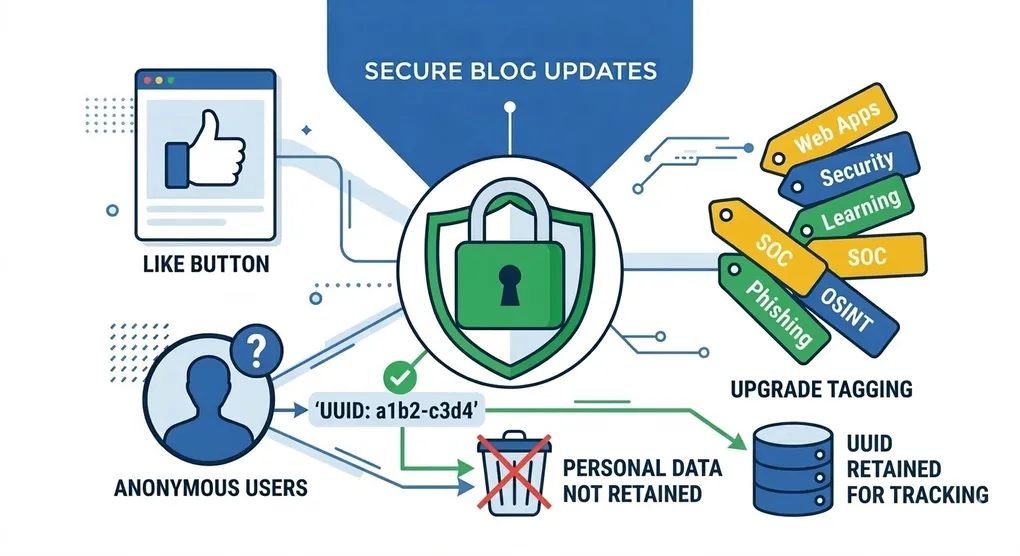
Adding Features to My Blog- and the Security Conversation That Came With It
One thing I have noticed about this blog is that it tends to grow alongside my own understanding of what I want it to be. What started as a simple place to log projects has steadily evolved into something I actively think about and improve. Recently, I found myself wanting to add a couple of features that felt genuinely useful to the experience: a way to filter posts by topic, and a way for visitors to leave a like on a post they found valuable.
What I did not expect was for a like button to turn into a conversation about privacy and security design. But honestly, that is the best kind of rabbit hole to fall into.
Topic Filtering
The first feature was relatively straightforward. Each post on this site already carries a topics field in its frontmatter- a simple array of strings like ['Security', 'OSINT', 'Phishing']. The data was already there; it just was not being used for anything beyond sitting in the markdown file.
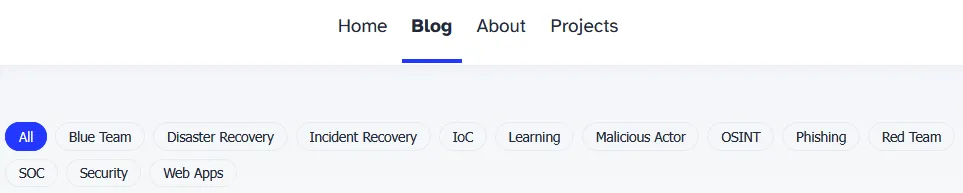
The goal was to surface those topics as clickable filter buttons above the post grid on the /blog page. Clicking a topic would show only posts tagged with that term, without navigating away or reloading the page.
Since Astro is a static site generator, there is no server processing requests at runtime. The entire filtering logic had to live client-side. The approach was straightforward:
- When the site builds, collect every unique topic across all posts.
- Render those as pill-shaped buttons at the top of the page.
- Tag each post card with a hidden list of its topics so the page knows which ones belong to which filter.
- A small JavaScript block reads which filter was clicked, then shows or hides posts accordingly.
The result is a clean, zero-reload filtering experience that costs nothing to run- no API calls, no backend, just HTML and JavaScript doing exactly what they are designed to do.
Adding the Like Button
The like button was where things got more interesting. The concept is simple enough- a thumbs up icon, a running count, and some way to remember whether the visitor has already liked the post. Simple in concept, but the implementation details matter a lot.
My first instinct was the obvious one: store the liked state in localStorage. When a visitor likes a post, save that post ID locally. On the next visit, read the value back and reflect the liked state. Clean, simple, no backend required.
But there was an immediate problem with relying on localStorage alone: the count itself. Where does it actually live? If the count only exists in the browser, every visitor sees their own personal count of zero or one. That is not meaningful. I needed a real shared count stored somewhere outside the browser.
That pointed me toward a hosted database. Since this site runs as a static web app on Azure and I was not looking to spin up a dedicated server, I landed on Supabase- a free, hosted PostgreSQL database with a REST API that works well with static sites. Supabase stores the like count per post, localStorage tracks whether this browser has already liked, and on clicking the button the count increments in the database while the post ID is saved locally.
That was the first version. Then I stopped to ask a question.
Is This Actually Secure?
Before committing to that approach, I paused to ask something I have been training myself to ask more deliberately: is this actually secure? And am I storing anything about my visitors that I should not be?
It is a habit I want to build- not just making something that works, but thinking through what it does and what it exposes. Especially on a security-focused blog, it feels important to practice what I write about.
Breaking it down into two questions:
Privacy: What data is being stored? The localStorage approach only saves post IDs- strings like 2026/February/steam-phishing-attempt. Never a name, never an IP address, never anything identifying. On the Supabase side, the initial design only stored a post_id and a count. No personal information at any layer. From a privacy standpoint, this implementation was as clean as a feature like this realistically gets.
Security: Could someone abuse the system? Yes, and this is where it got more interesting.
The Problem With localStorage Alone
The localStorage check is a purely client-side gate. It prevents accidental double-liking in the normal flow of using the site, but it does nothing to stop someone who knows what they are doing from:
- Clearing
localStorageand liking the same post again, - Calling the Supabase API directly to increment the count,
- Writing a short script to fire off unlimited requests in a loop.
The Supabase project URL and the public API key are both visible in the page source. This is by design- that is exactly how Supabase is structured for client-facing applications. The public key has intentionally restricted permissions. But the localStorage check only exists inside my JavaScript. It is not enforced anywhere outside the browser.
For a personal blog, an inflated like count is not a crisis. But building habits around properly securing features- even small ones- is precisely the point of working on projects like this.
The Anonymous Token Approach
The solution was to move the “has this person already liked this?” check off the browser entirely and hand it to the server. Instead of the client deciding whether a like should count, the database makes that call.
Here is how it works:
On a visitor’s first arrival, the browser generates a random UUID using crypto.randomUUID() and stores it in localStorage under the key blog-visitor-token. The token looks something like f47ac10b-58cc-4372-a567-0e02b2c3d479. It identifies this browser instance- nothing more. No name, no IP address, no location. Just a random string.
When a visitor likes a post, that token is sent to Supabase alongside the post ID. A PostgreSQL function checks whether the (post_id, token) pair already exists in the database. If it does, nothing happens and the current count is returned. If it does not, the token is recorded and the count increments.
What is actually stored in the database about a visitor?
post_id: "2026/February/steam-phishing-attempt"
token:   "f47ac10b-58cc-4372-a567-0e02b2c3d479"
That is it. A post id for the respective post and a random string. Nothing that connects that token back to a real person.
Locking Down the Database
The database is split into two separate tables. The first, post_likes, holds the total like count per post and is publicly readable- that is how the button knows what number to display. The second, post_like_tokens, holds the record of which tokens have liked which posts and is completely locked off. Nobody can reach it directly from the outside.
Visitors interact with the data through two functions: increment_like and has_liked. Think of them as a front desk. You can ask the front desk to check something or update something on your behalf, but you cannot walk past them into the back office and do it yourself. The functions handle the logic; the tables stay out of reach.
This matters because the API credentials are visible in the page source. On a static site, that is unavoidable. But because the data is only accessible through those controlled functions, a visitor with the credentials can only do what the functions permit- nothing more.
The Page Load Experience
When the page loads, two things happen at the same time: the current like count is fetched so the button has a number to display, and Supabase is asked whether this browser’s token has already liked this post. When both come back, the button immediately reflects the correct state.
This is what makes the experience feel persistent across visits. The browser is not just remembering a post ID locally- the database itself recognizes the token. If someone clears their browser data entirely, a fresh token gets generated and they could technically like again. That is the honest tradeoff of any system that does not require a login. But for a personal blog that wants to respect visitor privacy, it is the right balance.
If I am being honest, I did not expect a like button to turn into a lesson in database access control and privacy-by-design. But that tends to be how the best learning happens- you start with a small, seemingly simple feature and follow the thread until it teaches you something meaningful.
A few things I took away from this build:
localStorageis a convenience layer, not a security control. It improves the experience and prevents accidental behaviour in normal use, but it should never be the only thing standing between a feature and someone who wants to abuse it.- Keep the logic on the server, not the client. When the API credentials are visible to anyone who opens the page source- as they have to be on a static site- the data itself needs to be protected by controlled functions that nobody can bypass from the outside.
- Privacy-conscious design does not have to mean less functionality. The anonymous token approach gives visitors a persistent, meaningful experience without collecting a single piece of identifying information.
- Ask the security question before the first commit, not after. I caught this early enough that the fix was straightforward. Building that habit earlier saves rework later.
AD.